
By Savvas Bout, Founder of Prefixx. Last updated 23 October 2026.
Using your own IP space in Azure BYOIP is far more portable than using a simple Elastic IP. Your IP addresses travel with you to different clouds, back to your on-premises infrastructure, and even to bare metal servers . However, setting up BYOIP on Azure to manage egress traffic comes at a cost. When configuring egress through your own address space, traffic can be routed through components like an azure firewall to enforce security policies before packets leave the network.
To get set up, you need to go through the BYOIP onboarding process for your IP ranges, which includes validating the LOA, signing the ROA for your ASN, and setting up the IRR route objects that correspond to Azure's edge.
If any of the values across the contiguous range of corresponding registry objects do not match what you set up, then all traffic destined to complete the whole process will come to a halt. Any mismatch discovered during the commissioning phase will prevent the prefix from being advertised and require you to revisit your registry configuration.
This guide will walk through the full Azure BYOIP workflow for readers who meet the eligibility criteria. This includes an explanation of the ROA and IRR objects that must be in place before submitting a request to Microsoft to validate a prefix. Understanding how Azure validates ownership through externally controlled allowlists is essential to completing the onboarding process successfully.
Engineers who do not currently hold a suitable block of IP address space to migrate to Azure typically find that acquiring or leasing the correct prefix to migrate to Azure is the longest part of the process to migrate to Azure. Working with a specialist provider to streamline prefix acquisition benefits customers by reducing the timeline from months to weeks.
The configuration of the custom IP prefix in Azure takes very little time to configure once the correct IP address space has been acquired/leased. This guide starts with the basics of how Azure models a custom IP prefix for use within a subscription. The az sku parameter determines which tier of public IP resource will be provisioned alongside your custom prefix.
What is Azure BYOIP and how custom public IP addresses work
Azure BYOIP allows customers to bring their owned IP address space into their Azure subscription.
Custom IP address prefix: what it does with IP ranges
A custom IP prefix is a contiguous block of IP addresses owned by your organisation, provisioned into Azure and announced via BGP. Azure treats it like its own public IPs, but you retain ownership and portability. Once provisioned, the custom IP prefix can be deployed across availability zones to ensure high availability for your workloads.
Your Azure subscription IP prefixes vs. Azure-assigned ones
Note that for Azure-assigned public IPs, these are assigned by Microsoft. For public IPs that you own and bring in via custom IP, these will be yours to withdraw, move to another provider, etc, and use in hybrid environments. Whether you provision an azure public IP from Microsoft's pool or bring your own address space, the underlying routing and reachability principles remain consistent across both deployment models.
Custom IP prefix ranges and the three provisioning phases
- Validation: Azure verifies ownership via a signed ROA or a DNS TXT record.
- Provisioning: The IP prefix is registered in the subscription but not yet advertised.
- Commissioning: Azure begins BGP advertisement. Public IPs from the prefix become allocatable.
Note that the team at Prefixx have already prepared the LOA, RPKI ROA and IRR objects required for your custom IP address prefix, ensuring the initial validation completes without delay. However, before any of this can happen, the block of IP addresses must have gone through Azure’s eligibility checklist. This preparation ensures that when you provision the prefix, customers traffic can begin flowing through your Azure infrastructure immediately after validation.
Requirements before you bring your own IP prefix
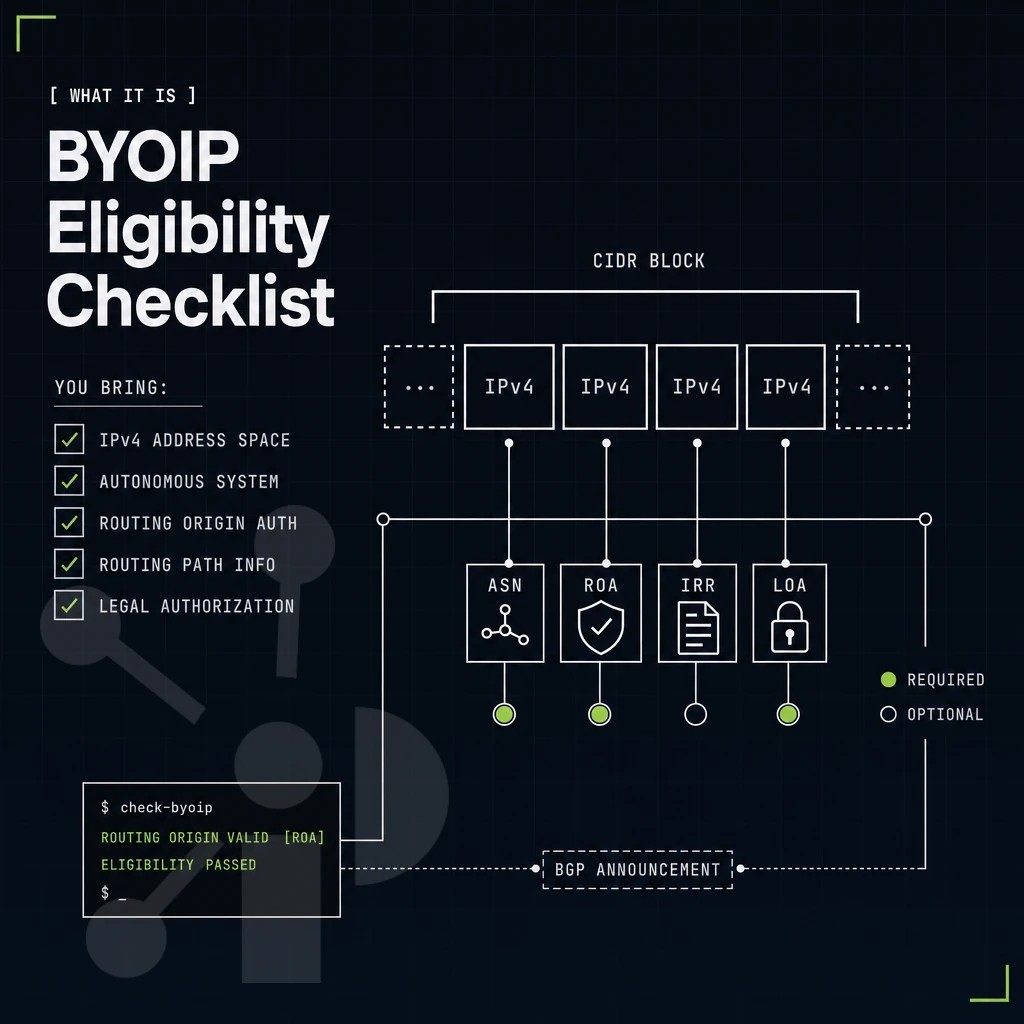
Here’s a very short but solid checklist for BYOIP on Azure.
What it means to own IP addresses and ranges
You need to own IP addresses that are registered with a routing internet registry (RIR) such as ARIN, RIPE NCC or APNIC. The corresponding WHOIS/RDAP records need to indicate your organization as the rightsholder of the IP addresses. The minimum amount of IP addresses for IPv4 is a /24.
Own IP ranges prefix readiness across availability zones
Your public IP range(s) must not be advertised from anywhere else during the onboarding process. BGP announcements of public IP prefixes to external destinations (in addition to the onboarding process) will block the validation process. Withdraw the relevant prefix from your current upstream provider before submitting for onboarding to Azure. Once the prefix is successfully onboarded and advertised through Azure, outbound data transfer follows the standard pricing model for charged internet egress.
Authorize Microsoft to announce your public IP addresses range
In terms of peering Azure will route addresses on the Microsoft Wide Area Network. Therefore the owner of the addresses needs to authorize Microsoft to originate IP addresses from their ASN. Furthermore the owner of the addresses needs to confirm that windows server activation and other Microsoft services are able to reach his addresses. The owner must ensure that the prefix is properly configured to integrate with the azure wide area network infrastructure for optimal traffic delivery.
Only after these documents have been set up correctly you can proceed with the provisioning of the three subsequent steps in the Azure Portal. The Azure Portal interface provides a straightforward command structure to initiate provisioning once documentation is verified.
How Prefixx supports Azure BYOIP with public IP prefixes
Before any bring your own IP block can be used in Azure, it must be clean, correctly registered at the routing internet registry, and backed by the right paperwork. Our zone redundant team prepares the LOA, RPKI ROA, and IRR route objects for the range advertised by you. Tixx quality control checks ownership, blacklist status, routing hygiene, and RIR standing before a single IP prefix moves.
- Zero buyer fees. Seller-only commission, no win no fee.
- LOA, RPKI ROA, and IRR objects prepared by our consultants.
- Tixx QC verifies every block before you bring your own IP addresses into Azure.
- BYOIP support across Azure, AWS, GCP, OCI, and Cloudflare.
- Inter-RIR transfers between ARIN, RIPE NCC, APNIC, and LACNIC.
Reach out to our team at Prefixx.net to discuss your public IP addresses and get a personalized quote.
Azure BYOIP enables you to bring your own IP address space, your own IP reputation , geolocation , etc. into the cloud. For example, the block of IP addresses that you bring must be at least a /24 in size and you must be a fully registered customer of a RIR that is supported by Azure.
In addition, you must have a signed authorization object for your block of IP addresses before Azure will add your BYO IP range to the Azure cloud. However, this capability will pin your prefix to a single region.
If any of these steps go wrong in the IPs derived onboarding flow, the whole process will stall.
If you need a clean, transfer-eligible block before you start, or want someone to handle the routing paperwork end to end, Prefixx prepares the LOA, ROA, and IRR objects for you and supports BYOIP deployment across all major cloud platforms.
Contact us to discuss your IPv4 needs today
No hidden fees, free consult. A broker replies within one business day.