
By Savvas Bout, Founder of Prefixx. Last updated 26 November 2026.
While buying a /24 (or larger) block of IPv4 addresses will help to solve the addresses shortage problem, deploying the newly purchased IPv4 address space is even a bigger problem. Getting it wrong could mean that your IPv4 addresses are not unreachable from important parts of the world, get stuck with a carrier that does not accept your LOA.
Alternatively, Gets even blacklisted by IP-reputation systems before you even send your first packet. Your IPv4 address space deployment greatly depends on how you move traffic around. This RIR issued the block of IP addresses for you, whether you need to run bare metal servers or want to deploy them in the cloud, and whether your current host supports BYOIP natively or not.
The range of options to announce your own IP space goes far beyond the classical on-site BGP announcements and colocations. Many Cloud Providers offer so called BYOIP services (Bring Your Own IP) for their cloud offerings like AWS, GCP, Azure and even Oracle Cloud.
Additionally, there are also dedicated bare metal hosting providers that not only offer BYOIP as an option but even as a first-class feature for their hosting offerings. This article will go through all of those options in detail and highlight the relevant technical details as well as the required routing paperwork to get your IP space announced and made reachable over the Internet.
What it means to deploy purchased IPv4 space
Having a block of IPv4 addresses and actually using them are two different things. The RIR transfer allows you to add your registration to the RIR database. The actual use of your block(s) of IP addresses for receiving traffic will happen with the deployment of the announced BGP route(s), allowing traffic to reach you.
What deployment actually means
The core activity is the BGP announcement. This can be done by your router or your provider’s router. The BGP announcement gets propagated by your upstream peers to all other peers in the world. Without the announcement of a registered block, it will remain invisible to the rest of the Internet, regardless of who is listed as the owner with the RIR.
Three supporting steps complete a working deployment:
- LOA for announcing network, which authorizes them to announce your prefix.
- RPKI ROA, cryptographically ties your prefix to the correct origin ASN.
- IRR route object, satisfies filters at major upstream transit providers.
Ownership versus reachability
The A /24 transferred last week under ARIN registration is not yet reachable. In addition to an ASN, the client also needs a willing upstream for their IP, and a mountain of paperwork above. We can prepare LOA, ROA, and IRR objects for the client in short order to close this gap for them.
Three deployment paths
A /24 network can be announced from any network infrastructure. The announcement of a block does not depend on where the block resides.
- On-premises or colocation, you control the router and the cage.
- Cloud BYOIP support, all major cloud providers (AWS, GCP, Azure etc.) support customer-owned IP prefixes.
- Bare-metal hosting, someone else books a block of servers at a datacenter for you.
There are many different paths to transferring traffic. Each has its own combination of cost, control, and flexibility. This article first describes how BGP announcement works for completed transfers.
How BGP announcement works after a transfer
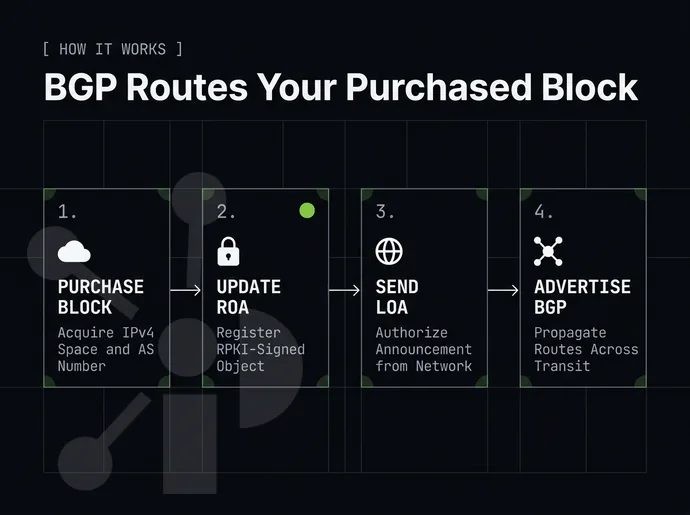
There are four sequential steps to buy a block and route it.
The four steps in order
First, get a Letter of Authorization from the previous holder of the announcement(s) for the prefix(es) in question, or from the RIR which assigned the prefix. Next, create an IRR route object that announces the prefix in question from your ASN. Then, sign an RPKI ROA that validates the origin ASN of your announcements. Finally, announce the prefix via BGP to your upstream provider(s).
Each step gates the next. An upstream provider may reject a BGP announcement that is missing a corresponding IRR route object. BGP announcements not covered by some ROA are marked by validators as being RPKI invalid. The LOA is the base object that cannot be created legitimately without it, and thus also the IRR and ROA objects.
Geolocation lag after transfer
Note that updating the geolocation database for your region is not completed by these steps. MaxMind, IP2Location, DB-IP, and ipinfo.io maintain independent data sets for geolocation. It can take days to weeks for new blocks of IP space to be geolocated correctly after they have been routed.
The fix is a simple RFC 8805 geofeed, a structured CSV file that maps your prefixes to the correct country, region and city. You need to submit this to each provider individually. Prefixx publishes and regenerates its own geofeed on a daily basis at 06:00 UTC. We apply the same discipline to all other blocks that we manage for our clients.
Decision guide
If your app has latency issues or is ad-tech focused then geolocation accuracy matters from day one. Get your geofeed submitted before you go live and have your app misrouting users down a street. Don’t treat LOA, IRR, ROA and geofeed as a to-do list, treat it as a checklist to complete.
Now that we have the announcement process covered, we need to decide where to run the underlying infrastructure for this. The most direct option is bare metal.
Deploying on bare-metal servers: pros, cons and fit
Bare metal servers are typically the fastest and most cost-effective way to bring newly purchased IPv4 address space into production.
Preparation
- Confirm that all required routing documents are in place. Prior to a provider accepting an announcement of your new prefix, the following 3 items must be in place: Letter of Authorization, RPKI ROA, and IRR route object s for the relevant routes. The Prefixx team will complete all of these documents as part of the transfer process to your new provider.
- Verify BGP competence. When renting bare metal, you will need someone to set up BGP sessions, correct communities and route filtering. If you don’t have this in house, you should look for a managed BGP option with your hoster.
Deployment
- Choose a bare-metal provider that supports native BYOIP. Some even include BYOIP and BYOASN in the normal price and do not charge per IP on top. Our ecosystem partner Prefixx works with Netrouting and we support BYOIP on all dedicated servers there.
- Hand over your LOA and your routing objects to your provider. The network department of your provider checks your LOA against the RIR records of your AS Number and configures the BGP session to include your IP prefix. This process needs some time for checking.
- Announce the block and check for propagation once the session is live. Check for the announced prefix in the routing table and verify the RPKI state is valid for that prefix.
Note: Announcing without a valid ROA leaves your prefix vulnerable to route hijacking. Never bring a block live before RPKI is confirmed.
Ongoing responsibilities
- Manage rDNS and abuse handling yourself. On bare metal, you are the operator of record. That means setting PTR records, responding to abuse complaints, and monitoring reputation lists. Prefixx's white-glove service covers these tasks for leased space, but for owned blocks on your own infrastructure, the responsibility sits with you.
If bare metal gives you too much operational control, take a look at cloud BYOIP offers, managed in a manner that is worth examination.
Deploying via cloud BYOIP programs: AWS, GCP, Azure and oci
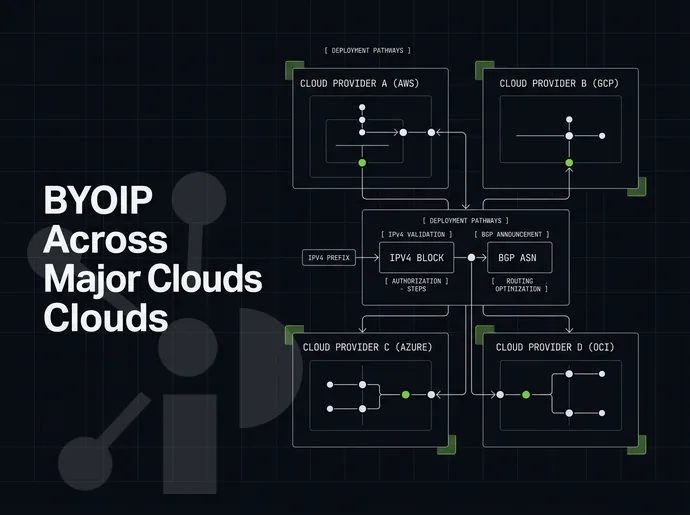
Cloud providers, including major ones, offer BYOIP programs. BYOIP allows you to announce your own purchased IPv4 block within the provider's network fabric. The block is announced on the provider's global backbone. This has its pros and cons.
Common onboarding requirements
Most programs start with a basic set of requirements. Typically, a block of at least /24 in size is required. You need to have a valid ROA signed with the provider's ASN, and a signed LOA that you send to the onboarding team of your provider.
The provider then originates your prefix from within their region and with their ASN. Prefixx creates the LOA, the RPKI ROA and the IRR route objects as part of the subscription process. So all required paper work is in place when you open the onboarding ticket.
Portability constraints
Note that a block which is active in a cloud BYOIP program is locked to a specific region / ASN of that cloud provider and cannot be announced from elsewhere. Provider specific rules for BYOIP apply (per region / ASN) and need to be checked before applying for a block.
Eligibility and specific restrictions per region vary a lot between providers and also between different blocks (accepted in one region but not in another).
A block announced by a cloud BYOIP service cannot be announced from a second origin. Announce the block with a withdraw before moving it to another provider or announcing it with your own BGP sessions.
Cloudflare magic transit as a variant
The same BYOIP functionality is utilized to serve DDoS-scrubbing for workloads instead of compute workloads. Announce your prefix from Cloudflare’s ASN and have Cloudflare scrub DDoS traffic for you. Clean traffic is then tunneled back to your servers. A legitimate method to DDoS-protect large blocks of IP space.
Cost dimension
Some cloud providers will also charge per IP address on top of the cost of the virtual servers. That additional charge for usage of your purchased IP addresses should be reflected in your total cost of ownership comparison between running BYOIP in cloud vs. running BGP on bare metal. As a note, Prefixx’s BYOIP service deployed on Prefixx’s Netrouting infrastructure does not have a per-IP surcharge.
A third option is colocation for operators who have their own equipment and require carrier-neutral hosting without being locked into a single cloud provider.
Deploying in colocation: when you own the cage
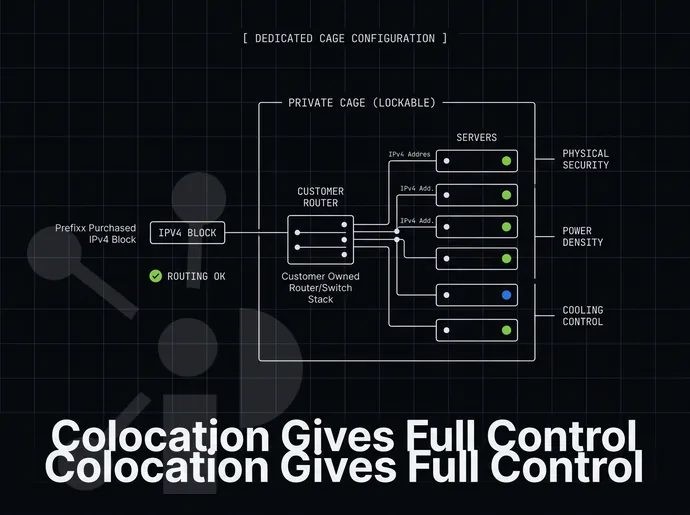
Colocation is the most in-depth way to control a block of IP addresses you purchase.
As a seasoned operator, you likely already own servers and thus in colocation you only pay for space and do not have to spend money on a monthly basis to rent servers.
When colocation makes sense
This path is used in specific scenarios.
- Announcing AS NUMBERS /20 or larger and need to announce split via multiple upstreams.
- You already operate your own routers and switching gear.
- Your architecture requires multi-homing across two or more transit providers to provide redundancy.
- Peering directly at an IX can help to reduce your average transit cost on high-volume traffic.
Routing paperwork still applies
Note that owning the cage does not mean you can skip any of the normal registry steps. In order to make your first BGP announcement, you will need a signed LOA from the block holder of the block you are buying, an RPKI ROA for your origin ASN , and an IRR route object for your announced route(s).
We set up all of this for our clients as part of our normal deal broker process, regardless of which registry or registries you end up announcing at.
Geolocation and the geofeed fix
For the first week or two your block will geolocate to the city of the data center where your block is hosted.
To correct this a geofeed submission in RFC 8805 format is required.
With all three options on the table, we can now more clearly assess the trade-offs between each.
Deployment path comparison: bare metal vs cloud BYOIP vs colocation
How you deploy the purchased IPv4 space determines every subsequent operational decision. This influences your routing, your cost, and who deals with abuse. Of the 3 real methods of use, bare metal, cloud BYOIP and colocation are the most common.
Side-by-side comparison
| Dimension | Bare metal | Cloud BYOIP (AWS/GCP/Azure/OCI) | Colocation |
|---|---|---|---|
| BGP control | Full, your own ASN | Provider-managed; limited path control | Full, your own ASN and hardware |
| Minimum block size | /24 (256 addresses) | /24 on AWS and GCP; /23 on Azure | /24 (BGP announcement floor) |
| Per-IP cost structure | No per-IP overhead after purchase | Provider charges per Elastic/static IP in use | No per-IP overhead; cross-connect and rack fees apply |
| Portability | High; move the block to any upstream | Locked to that cloud region | High; portable across facilities |
| RPKI/ROA requirement | Strongly recommended; Prefixx prepares ROA and IRR | Required by most cloud BYOIP programs | Strongly recommended; your team or broker manages it |
| Geolocation correction | RFC 8805 geofeed; Prefixx publishes daily | Provider submits on your behalf; slower to propagate | RFC 8805 geofeed; operator submits directly |
| Abuse handling | Block owner is responsible | Shared; cloud provider filters some abuse paths | Block owner is responsible |
| Typical use case | Hosting, CDN, mail infrastructure | Teams already running workloads on that cloud | Large-block operators with existing hardware |
Decision logic
Cloud BYOIP is best suited for workloads that reside on a single platform and user wishes to bring their own IP addresses to that platform without moving their infrastructure. The option of bringing your own IP addresses to cloud reduces BGP flexibility and results in user being charged for per-IP by cloud provider.
Bare metal lets you run a block of IP completely IP agnostic, without per-IP overhead. It’s particularly suitable for operators who want full control of IP routing and plan to scale up the block in due course. Prefixx manages the LOA, RPKI ROA, and IRR objects that constitute the routing paperwork.
Colocation is a good fit for teams with existing hardware who want carrier-neutral flexibility. The block of IP remains portable, and you retain full control over BGP.
Choosing a deployment path to announce your IP addresses to other parts of the Internet is only half the story.
Registry region and geolocation: how deployment location affects routing
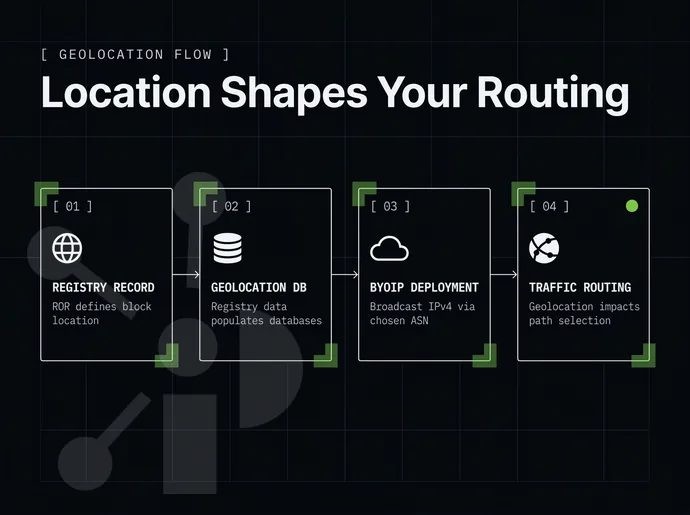
A block’s registry of record (ROR) determines how a geolocation database will categorize a block of IP addresses, independent of where the block is announced from. Thus a RIPE NCC announced block of IP addresses from a facility in the US can continue to resolve to Europe until the correction has been submitted.
Understand the default classification
- Determine the RIR for your block. This includes ARIN, RIPE NCC, APNIC, LACNIC and AFRINIC. Most geolocation databases use the registrar of record information first populated by these groups. This then can be overridden by the announcement location.
- Check current geolocation information by querying your prefix on MaxMind, IP2Location, DB-IP and ipinfo.io. This gives you a starting point and shows you where corrections on the above providers are needed.
Submit an rfc 8805 geofeed
- Create the geofeed file in CSV format according to RFC 8805. Upload the file to a stable HTTPS URL with a domain of your choice.
- Reference it in your WHOIS or RPKI object. Add a
geofeedfield pointing to that URL. This signals to providers that an authoritative override exists. - Wait for provider ingestion. All of the providers mentioned in this section (MaxMind, IP2Location, DB-IP and ipinfo.io) consume the geofeeds in their respective update schedules. Note that there is no instant propagation and you should check each provider’s next update cycle individually.
Note: Submitting a geofeed does not guarantee immediate correction. Each provider ingests on its own schedule. Budget time for this before a campaign or product launch that depends on accurate geolocation.
Verify and maintain
- Re-query all four providers after ingestion. Check country and region fields against announced location for the provider. Any discrepancies here are most likely caused by geofeed URL being down or a missing WHOIS reference.
- Make sure your geofeed is up to date. Even if you re-announce the same block of restricted URLs from a different geo location, make sure you update the geofeed file before doing so. A stale geofeed has the same effect as no geofeed at all.
We publish a daily RFC 8805 geofeed at Prefixx.net/geofeed.csv and for our customers on a lease, we manage the geolocation corrections as part of our white-glove service.
Geolocation is one aspect of the health of your IP addresses.
Reputation, blacklists and abuse handling after deployment
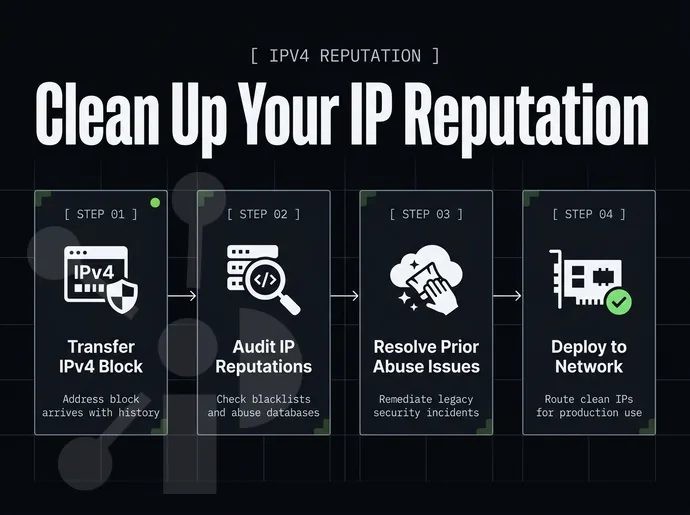
IP blocks transferred from prior operators often arrive with a tainted reputation. The prior operator may have operated mail servers, botnets or open proxies from the same IP addresses and thus be listed on various DNSBLs.
Pre-sale quality control with tixx
Tixx conducts a comprehensive pre-sale check on any block transferred via Prefixx including verification of the owner, check of transfer eligibility, blacklists and routing health.
Tixx does not guarantee delisting of items.
Dnsbl mechanics and delisting responsibility
Each DNSBL is independent and they each have their own listing criteria and methods for removing a domain from their lists. While the Spamhaus ZEN list contains all entries in the SBL, XBL and PBL lists, the Barracuda, SpamCop, SORBS and CBL lists each have their own unique criteria for adding and removing domains from their lists.
In addition, even though a domain may be blocked on several lists, removal from each list would have to be requested individually from the new operator.
Note: delistings do not expire automatically when transferred to another operator.
Ongoing monitoring and rdns management
Our client portal is constantly monitoring a user’s reputation on 12 DNSBLs. BGP monitoring is done via RIPEstat and the RIPE Routing Information Service. We are monitoring origin ASN, RPKI validity, IRR consistency and upstream visibility. Note that missing or wrong PTR records cause problems with mail servers and CDNs that don’t accept traffic from IP addresses without reverse DNS.
Per-record PTR management and full zone delegation for /24 and larger blocks via AXFR are handled through the portal.
The ongoing operational expense of reputation management is one factor that influences whether a company will lease or buy a solution, and why this decision makes a big difference.
Leasing vs buying: which makes more sense for your deployment plan
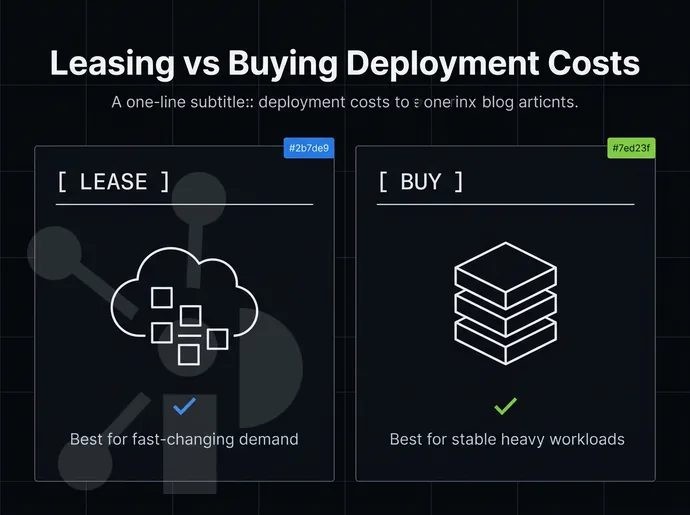
This all depends on how long you need the land and what you plan to do with it.
You will also be able to sell the land at a later time.
When leasing fits better
Leasing is good for short-term or exploratory workloads. For example, testing out a new market, running a short-term marketing campaign, or filling a gap until a purchase completes and RIR transfer starts, leasing provides you with IP routed space without having to spend capital.
- Short project with a defined end date.
- Market testing before committing to a permanent block.
- Bridging coverage while an RIR transfer completes.
We guarantee non-revocation for all our leases, include RPKI, LOA and rDNS in our offerings, and provision within 24 hours. Our white-glove service even creates all relevant routing documents for you.
When buying fits better
But when building long-term infrastructure, buying is likely the better deal. You get to own the block of IP, to build a reputation on that space over time, and to eventually sell that block of IP to someone else. For a production mailer or a CDN edge node, owning that space of IP is a much better foundation than renting it.
Making the call
A useful rule: if the deployment runs beyond 18 months, the total cost of leasing typically approaches or exceeds a purchase. Our consultants walk through both scenarios on every inquiry. The Prefixx.net/lease-vs-buy page covers the full comparison in detail.
The process for buying IP space and leasing IP space follows similar steps for routing, deployment, and support.
Why Prefixx for BYOIP deployment support
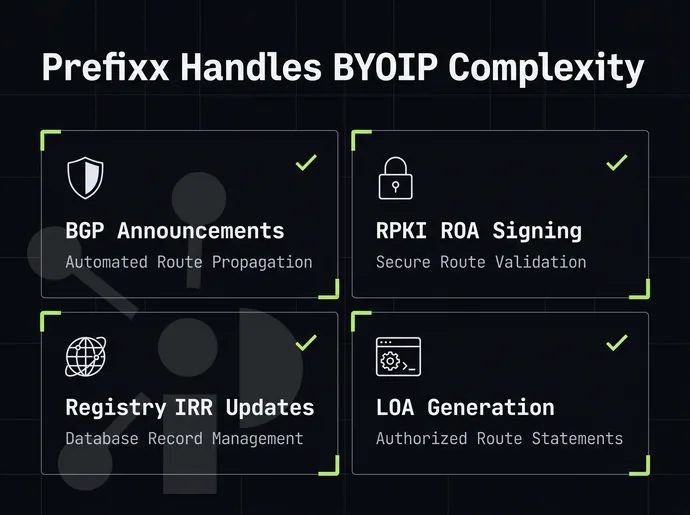
After the IPv4 transfer has closed, a lot of work needs to happen: setting up the BGP announcements, generating and signing the RPKI ROAs, creating the IRR route objects and getting all geolocation databases up to date with the new owner of the IP address space.
Prefixx takes care of all this for you. Our team will create a LOA, sign the ROA and file the IRR route objects for you. Additionally, we will create and submit an RFC 8805 geofeed to providers like MaxMind and IP2Location to update the location of your IP address block as soon as possible.
- Tixx QC before you announce: Every block passes ownership checks, blacklist scans, and routing hygiene review before it reaches you.
- BYOIP on bare metal, no surcharge: BYOIP is natively included on Netrouting bare-metal servers (our partner network), with no per-IP fee.
- Cloud BYOIP supported: Our consultants support deployment onto AWS, GCP, Azure, OCI, and Cloudflare BYOIP programs.
- White-glove ongoing: Reverse DNS management, DNSBL monitoring across 12 reputation lists, geolocation correction, and abuse complaint handling are all included with every lease.
- RIR transfer expertise: We broker IPv4 transfers across ARIN, RIPE NCC, and APNIC, with LACNIC facilitated, and handle the autonomous system number paperwork where needed.
If you want a clean block and a smooth path to announcing it, talk to our team about BYOIP deployment support.
Common questions about deploying purchased IPv4 space
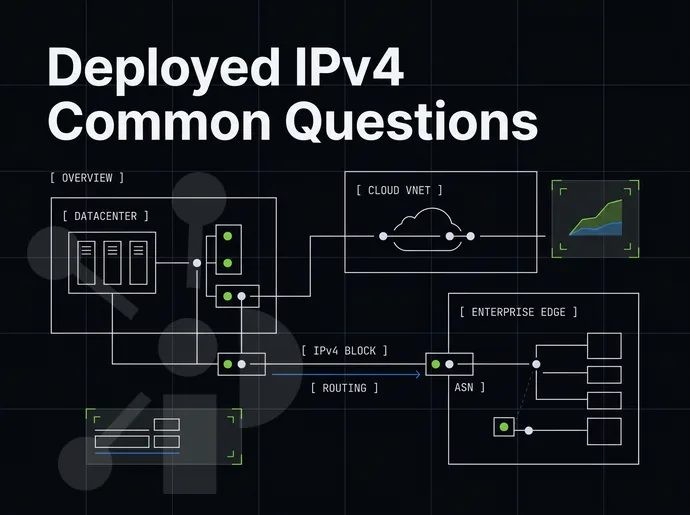
Buying IPv4 addresses is only half the job.
Before you announce
Do I need an ASN to use purchased IPv4 space?
This can be arranged if you intend to announce the block via BGP.
What routing paperwork do I need after buying a block?
You need an LOA from the registered holder, an RPKI ROA tied to your ASN, and an IRR route object matching both. Without all three, upstream providers may filter your announcement. Prefixx prepares each of these on your behalf as part of the white-glove service.
How long does RIR transfer take?
Note that the time required to process a transfer varies greatly between registries, and can be greatly affected by whether the transfer is intra-RIR or inter-RIR. We cannot give a specific time frame for any of these. The Prefixx team will complete all of the relevant paperwork for you, and keep you updated on progress through the transfer process.
After the transfer
Can I bring my purchased block to a cloud provider?
Yes. AWS, GCP, Azure and OCI all support BYOIP. Cloudflare do as well for customer-owned space. You upload your LOA and ROA to the provider’s onboarding portal. Prefixx prepare the documents for upload to the portal for submission.
What if my block has a poor reputation?
Tixx verifies every block before listing it for sale.
Where should I deploy if I need bare-metal hosting alongside the block?
BYOIP is native on all of our bare metal servers. There is no additional charge per IP. We have a partner network of datacenters in Amsterdam, Stockholm, Miami and Hong Kong. The LOA, ROA and IRR objects for the needed PrefixIO account are created by the Prefixx team and all is ready to provision the server.
Key takeaways: choosing the right deployment path for your IPv4 block
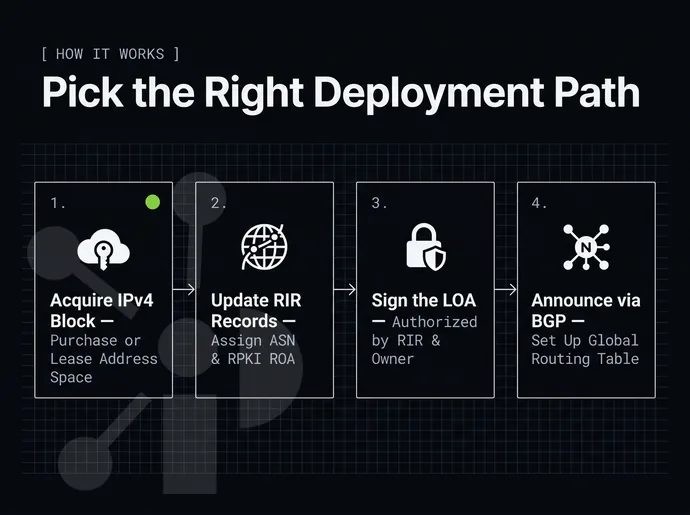
Your deployment path depends on control requirements. Bare-metal servers give you full BGP announcement authority and no shared-tenancy constraints. Cloud BYOIP fits cloud-native teams already running workloads on AWS, GCP, Azure or similar platforms. Colocation suits large-block operators who need physical infrastructure without full ownership.
Regardless of path, the LOA, RPKI ROA and IRR route object are non-negotiable prerequisites. Complete the RIR transfer before any BGP announcement goes out. Run DNSBL checks and reverse DNS hygiene before the block is visible. Geolocation correction via an RFC 8805 geofeed is a separate step from the IPv4 transfer itself and needs its own attention. Prefixx handles all routing paperwork and BYOIP deployment support end to end. See the Prefixx.net/BYOIP page for details.
Frequently asked questions
Do I need my own ASN to announce purchased IPv4 space?
Not necessarily.
What documents do I need before I can announce a transferred block?
You need three things in place before your upstream will route the block: a Letter of Authorization (LOA) confirming you hold the resource, at least one RPKI Route Origin Authorization (ROA) signed under the correct RIR, and an IRR route object matching your origin ASN.
The RIR transfer must also be fully completed and reflected in the registry's WHOIS before any of those documents carry weight. Prefixx prepares all three as part of its white-glove service, so you are not chasing paperwork after the deal closes.
How long does it take for geolocation databases to reflect a new deployment location?
The major providers, including MaxMind, IP2Location, DB-IP and ipinfo.io, update on their own schedules, and corrections can take anywhere from a few days to several weeks to propagate fully. Publishing an accurate RFC 8805 geofeed accelerates the process because those providers consume it directly. Prefixx publishes a geofeed regenerated daily at 06:00 UTC and submits corrections to each provider on your behalf as part of the white-glove service.
Can I use purchased IPv4 addresses with AWS, GCP or Azure BYOIP?
Yes. AWS, GCP and Azure all run BYOIP programs that let you bring a transferred block into their environments and advertise it from their edge. Each cloud has its own minimum prefix size and verification process, typically requiring an LOA and a signed ROA. Prefixx supports BYOIP deployment across AWS, GCP, Azure, OCI and Cloudflare, preparing the required routing documents on your behalf.
What is an RPKI ROA and why does my upstream require one?
An RPKI Route Origin Authorization is a cryptographically signed record that tells the global routing table which ASN is authorized to originate a specific prefix.
Creating the ROA requires access to the RIR's resource portal for the registry that holds your block.
What happens to blacklist listings when I take ownership of a block?
Blacklist entries follow the IP addresses, not the previous owner, so you can inherit listings from prior abuse even after a clean transfer.
For leased space, Prefixx monitors reputation continuously and handles abuse complaints and delisting requests as part of the white-glove service.
Should I lease or buy IPv4 space if I only need it for six months?
Lease. A purchase involves RIR transfer fees, broker commission, escrow settlement and routing setup, all of which make sense when you hold the asset for years, not months. A lease gives you a provisioned, routable block within 24 hours, with LOA, RPKI and rDNS handled, and no exit costs when the term ends. If your requirement grows or becomes permanent, you can reassess buying at that point.
Purchased IPv4 space is only as useful as the infrastructure behind it. Bare metal gives you the cleanest BGP control and the lowest per-IP overhead. Cloud BYOIP programs let you keep your addresses while running workloads on managed infrastructure, at the cost of provider-specific constraints. Colocation sits in between: your hardware, someone else's power and fiber.
From all the different ways a block can be deployed, the routing paper work looks the same: a valid LOA, RPKI ROAs and IRR objects that all look the same. If you get that wrong your block will not route regardless of where the block was deployed from.
If you have recently acquired a block or are weighing your options before a purchase, Prefixx handles the full transfer and routing setup end to end. Tixx checks every block before it moves, and the white-glove team prepares your LOA, ROAs and IRR objects. Reach out at Prefixx.net to get started.
Contact us to discuss your IPv4 needs today
No hidden fees, free consult. A broker replies within one business day.