
By Savvas Bout, Founder of Prefixx. Last updated 27 November 2026.
Comparing the BYOIP for every major cloud provider (such as AWS, Google Cloud, Azure, Oracle Cloud Infrastructure, Cloudflare) side by side to help understand the pain point of the routing paperwork and the allocated address space as well as the timeline in days until the allocated address space starts announcing once the ticket has been submitted.
Every cloud provider has its own onboarding process with different minimums for the prefix size as well as different requirements for the ROA and LOA. Also the time frame until all allocated address space starts announcing differs from cloud provider to cloud provider. One small mistake and you have to start all over again.
For network engineers and IP address managers the comparison of cloud-based IP address management tools typically does not end at the provider’s web console.
This Transfer procedures have to be performed with the RIR and whether the allocated IP addresses will also remain valid in case the connection to the provider changes.
What BYOIP means and why it matters for cloud deployments
BYOIP allows a customer to advertise their own IPv4 prefixes within a cloud provider's network, rather than using assigns IP addresses. The ability to use your own IP addresses at cloud providers greatly affects IP reputation, application whitelisting, and even how you plan your migrations to cloud providers. All of the major cloud platforms (AWS, Azure, Google Cloud, Cloudflare) support BYOIP, but the specific requirements and tradeoffs for use vary greatly.
What BYOIP actually does
When you provision provider-assigned addresses, the cloud manages IP addresses within a provider pool which contains your PTR records, your reputation history and your whitelist entries. BYOIP reverses this, allowing you to bring your own IP space and have your provider announce your owned block via BGP.
Your IP identity travels with you. Outbound IP from your payment processor will remain the same whether originator traffic is routed through us-east-1 (AWS) or a bare-metal server. IP-based firewall rules at intervening partner organizations will continue to function unchanged.
Why organizations care
- Reputation continuity: A clean sending history of a block is persisted. Provider pools for shared SMTP servers of other tenants carry their abuse records.
- Whitelisting stability. Partners & customers whitelist your IPs once. Provider reassignments silently break these rules.
- Migrate flexibility. Re-IP-ing an application stack is expensive and error-prone. With portable prefixes you do not have to re-IP an application stack anymore when switching providers.
- Brand consistency. The PTR records for your domain will not be set to the reverse-DNS namespace of your provider.
What BYOIP requires from you
Each cloud BYOIP program requires a couple of core steps to get started. First you must own a verified block that is verified to your name with a RIR (such as ARIN). Second, you must provide your chosen provider with a Letter of Authorization (LoA) that states the IP address that the provider is authorized to originate. Additionally, most cloud providers require a signed Route Origin Authorization (ROA) for your IP space.
Tixx prepares LOA, RPKI ROA and IRR route objects for you. We check (for your block) ownership, blacklists and other issues relating to routing before announcing anything. The per-provider variations are then something to be mapped on top of this.
How each major cloud provider handles BYOIP
While BYOIP is supported by all major cloud providers, each has its own set of documentation requirements and operational constraints. Below is a table comparing 5 providers against the most relevant criteria to consider when choosing a block to bring into the cloud.
Provider requirements at a glance
| Provider | Min. prefix (IPv4) | Required docs | Notable restriction |
|---|---|---|---|
| AWS | /24 | RPKI ROA | Prefix locked to a single AWS region; one ROA per pool |
| Google Cloud | /24 (IPv4), /48 (IPv6) | RPKI ROA + LOA | Prefix scoped to one GCP project |
| Azure | /24 | RPKI ROA + LOA | Global tier vs. Regional tier; Global requires /24 or larger |
| Oracle Cloud | /24 | RPKI ROA + LOA | Prefix tied to a single OCI region |
| Cloudflare | /24 | LOA + RPKI ROA | Magic Transit and Spectrum only; not general compute |
Where providers diverge
AWS has the most streamlined ROA process, a valid ROA with reference to Amazon’s ASN can be used to provision a /24. In contrast, Google Cloud and Azure require a LOA in addition to the ROA, which can often cause significant delays while the LOA is being prepared.
The two-tier model offered by Azure is the most complex model. The Global Custom IP Prefix allows you to advertise a block of IP addresses globally across all regions of Azure, whereas the Regional prefix is restricted to use within a single region. Therefore, if you choose the wrong model when you set up a new prefix, you will have to re-provision the entire prefix.
Cloudflare's BYOIP is designed to run DDoS mitigation and traffic acceleration services like Magic Transit and Spectrum. So, this is not a general purpose compute network. Ensure your use case fits before reserving a block on this BYOIP.
Preparing your paperwork before you start
While the minimum required for onboarding with most providers is a valid RPKI ROA, many also require a LOA to be issued, and some even require IRR route objects to be fully routing compliant. Typically, the biggest cause of delay to onboarding here is the incorrectly issued documents.
Prefixx creates LOA, RPKI ROA, and IRR route objects for you as part of the BYOIP service. If you need your block to be announced on one of these platforms, please let sales know before starting the onboarding process for the respective provider. A detailed comparison table outlining all the requirements for the respective platforms is available below.
BYOIP requirements side by side: a comparison table
The basic documentation for a cloud BYOIP program is identical, i.e. a Letter of Authorization and an RPKI ROA for the respective IP block. The most important thing: the IP block must be clean and transferable. In the following table we compare the required documentation for the 5 most common platforms.
The comparison table
| Provider | Minimum prefix | ROA required | LOA required | IRR route object required | IPv6 BYOIP supported | Geographic scope | Notable restrictions |
|---|---|---|---|---|---|---|---|
| AWS | /24 | Yes | Yes | Yes | Yes | Regional (per-region pool) | Block must be publicly routable for 12 months before onboarding |
| GCP | /24 | Yes | Yes | Check docs | Yes | Regional (per-region pool) | Prefix must not overlap existing GCP ranges |
| Azure | /24 | Yes | Yes | Check docs | Yes | Regional (per-region pool) | Validation can take several business days; custom IP prefix must be provisioned before use |
| OCI | /24 | Yes | Yes | Check docs | Yes | Regional (per-region pool) | Block must be registered in a supported RIR; BYOIP scope tied to the tenancy region |
| Cloudflare | /24 | Yes | Yes | No | Yes | Global (anycast) | Anycast only; block is announced from Cloudflare's global network, not a single region |
What the table means for your block
All five providers set /24 as the minimum (no smaller blocks available on any platform). If you hold a /25 or /26, your options are to consolidate under what you already have or acquire a completely new block.
ROA and LOA are universal. IRR route objects are required by AWS and advisable everywhere else. Note: a missing or mismatched IRR entry is the most common reason BYOIP validation stalls, even when the ROA is valid.
Cloudflare is one of the only providers with global scope. All the other providers in the list tie a prefix to a region. You should plan your announcement strategy before you sign the LOA.
Prefixx prepares the LOA, RPKI ROA and IRR route objects for the blocks we service. Tixx highlights any issues that need to be fixed before onboarding with a provider. We’d be happy to get you set up with a sales contact to discuss further. In the mean time it’s useful to have an understanding of what each of these 3 documents are used for and where things can go wrong.
The hidden paperwork: LOA, RPKI ROA and IRR route objects
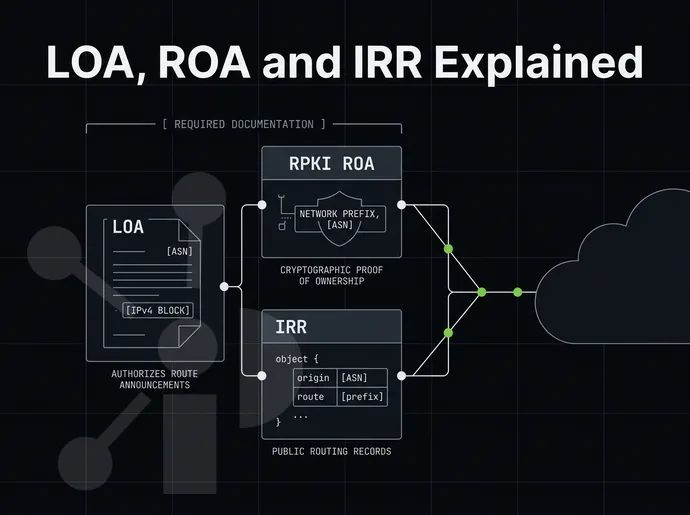
Every cloud BYOIP service requires three routing documents to be completed and accepted for any IP address space you wish to announce. A single incorrect entry in any of the 3 routing documents can cause your announced BGP routes to be denied by the carriers upstream of the cloud service provider.
What each document does
An LOA is a signed letter from the RIR-registered contact of an ASN authorizing a particular IP address prefix to be advertised by that ASN. The cloud services provider requires a valid LOA to open a ticket to announce your additional space.
An RPKI ROA is a signed object (stored in a RIR's repository). An RPKI ROA states which prefixes a host/organization is allowed to advertise from which AS Number (or numbers). Additionally the maximum length of the advertising prefix is specified. On routers that have been configured to validate RPKI announcements, these that violate a router configured RPKI ROA are marked as “invalid” and discarded.
A plain text object in a routing registry (such as RIPE DB, ARIN IRR, RADB) that upstreams build prefix filters from. A single missing Route Object, or one with wrong origin AS Number, causes such filters to silently discard announcement of that Route Object’s prefix.
Failure modes
The most common cause for ASN rejection is that the ASN in the LOA ASN does not match the ASN of the origin ASN in the ROA causing a prefix notation failure. RPKI “invalids” spread very quickly. It can take hours or more to fix a bad ROA and have it propagate through all of a RIR’s publication points.
An RPKI ROA with a max-length set too narrow will incorrectly flag more-specific announcements as invalid and thus silently blackhole traffic even after the cloud provider has accepted the announced prefix.
How Prefixx handles this
For the support of our clients’ BYOIP deployment, Prefixx prepares the LOA, RPKI ROA, and IRR route objects and reviews them for consistency prior to submission. Our specialists are hands-on and check each field of the documents against the corresponding RIR record before they are signed and published.
Correct paperwork is necessary but not sufficient. Another variable cloud providers don’t check for you is the reputation history of the block.
IP reputation and block quality: what cloud providers won't tell you
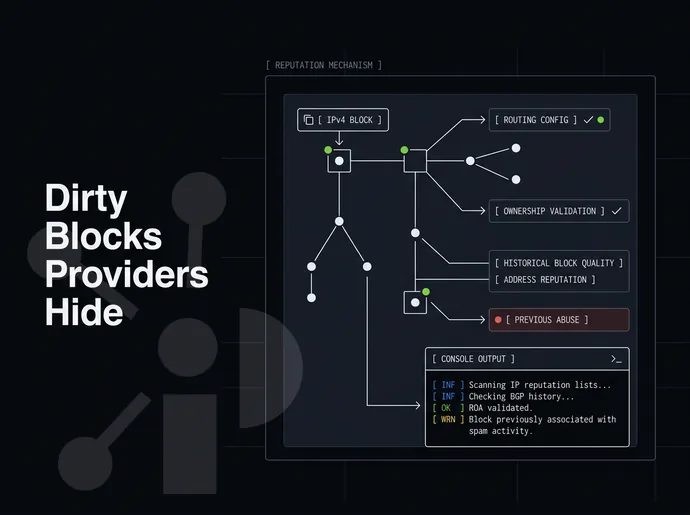
Each cloud provider validates that you own the block of IP addresses and that your routing configuration is correct.
Dnsbl listings and BGP hijack history
Blacklist entries have no expiration date. So a block banned two years ago for spam, hosting botnets, or a BGP hijack will bring all this weight onto your servers. Email will not get delivered. Ad networks will reject IP-ranges. Silent negative scoring by fraud-scoring APIs.
The specific risks to audit before deployment include:
- Check for active listings on the following spam databases: Spamhaus ZEN, Barracuda, SpamCop, SORBS, CBL.
- BGP origin-ASN inconsistencies suggesting prior hijacking.
- Open abuse complaints for prefix still at RIR.
- RPKI invalidity or missing IRR route objects from a previous holder.
Geolocation database lag after a transfer
It can take geolocation databases up to weeks to include a new IP address block assignment in their databases. Updates for MaxMind, IP2Location and ipinfo.io happen on their respective schedules. In the meantime, geolocation-based decisions for your traffic might end up in the wrong country, violating CDN rules, geo-restricted content licenses and even regional compliance regulations.
We provide a daily geofeed for the major providers according to RFC 8805 at Prefixx.net. The propagation delay for corrections however is real and cannot be compressed to zero.
How tixx catches problems before deployment
We use Tixx by Prefixx as our pre-sale and pre-deployment layer for quality control. Here we check for ownership and transfer eligibility as well as blacklist status on 12 different DNSBLs, routing as well as RIR status. Every block that we broker Tixx through before we sell it to customers or put it into a customer’s BYOIP workflow.
We cannot guarantee a delisting. What we can guarantee is that you will know exactly what you’re buying when the transfer is complete, rather than finding out from a bounced email.
BYOIP on bare metal vs BYOIP on public cloud: key differences
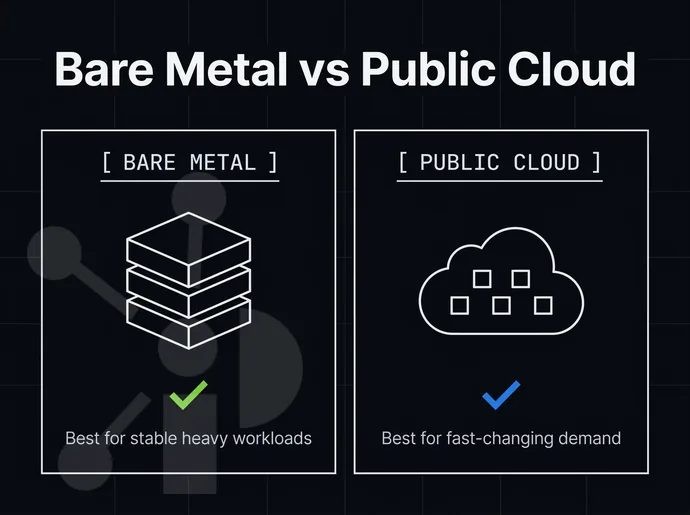
BYOIP works differently depending on the platform. Public cloud providers and bare-metal hosting services allow customers to announce their own IP prefix, but the control model, portability and operational complexity at scale can differ greatly between the two.
How announcement control works
In the public cloud, the prefixes of customers like you are announced by the AS numbers of AWS, GCP, Azure, OCI and Cloudflare. Since you are not running BGP yourself, a given block is associated with a specific region, VPC or even account. Thus migrating to another provider typically means provisioning from scratch.
Announcing BGP directly from bare metal hosting is how the hosting partner functions. Announcing from your own ASN, or that assigned to your server infrastructure, is possible. Our ecosystem partner Prefixx at hosting provider Netrouting (AS6206) lets you bring your own IP addresses (BYOIP) and your own AS numbers (BYOASN) to your dedicated servers without extra charge per IP address. We’ll do the LOA, RPKI ROA, and IRR route objects for you to get your block online quickly.
Portability and lock-in
| Dimension | Public cloud BYOIP | Bare-metal BYOIP |
|---|---|---|
| BGP control | Provider-managed, no operator BGP session | Operator or hosting partner runs BGP directly |
| ASN flexibility | Announced from provider's ASN | Any ASN the operator controls |
| Prefix minimum | /24 on AWS and GCP; /24 on Azure; /24 on Cloudflare | /24 standard; hosting partner policy applies |
| Vendor lock-in | Block locked to provider region or VPC | No announcement-side lock-in |
| Routing paperwork | Operator submits LOA; provider handles the rest | Prefixx prepares LOA, ROA, and IRR objects |
| Per-IP cost | Per-IP charges apply on most platforms | No per-IP surcharge on Netrouting bare metal |
Which path fits your situation
Public cloud BYOIP is typically best suited for organizations with existing workloads already running in a single public cloud provider’s ecosystem, and announcing within that same provider’s announcement model. The announcement of a BYOIP does not necessarily follow to new announcements of IP address space when a organization changes to a new cloud provider.
Bare-metal BYOIP is better for customers that require full BGP control, multi-homing and the ability to move announcements without having to re-provision. It also avoids per-IP charges on large blocks of IP addresses.
For portability of a /24 or larger IP block, bare metal with Prefixx managed routing documents is generally easier to manage than moving a block of IP addresses and setting up new routing documents with another provider. We'd be happy to discuss sourcing a /24 or larger block of IP addresses and preparing the LOA, ROA and IRR updates required for announcement. The cost differences between these two paths are significant and worth consideration.
Cost considerations: what you actually pay across providers
The cost of Cloud BYOIP has many line items that most teams have not thought of when budgeting. Map out all of the costs and charges before committing to a service to avoid surprises at the end of the month.
Model the cloud charges
- Audit idle-IP fees. For AWS, these fees are charged on a per hour basis for each Elastic IP not in use on an instance. For GCP and Azure, there are similar charges for idle-IP addresses. For each address in your prefix, sum up the hours it was unattached in the month.
- Check for check per-IP-in-use fees. As AWS charges per-IP for BYOIP addresses that are actually in use, check if GCP or even Azure would charge equivalent in-use fees for that prefix size in that region.
- Price OCI separately. The fee model for OCI is different from the other three cloud providers. Review the current public-IP pricing page for OCI to get the latest information on pricing for that service, as it does not currently mirror AWS or Azure pricing for that service.
- Be sure to include the costs of bandwidth on Cloudflare’s Magic Transit product. Cloudflare charges Magic Transit based on bandwidth, not per IP, so calculate your monthly average bandwidth and apply that to the bandwidth rate and any prefix announcement fees.
Note: Teams routinely undercount idle addresses. A /24 announced into a cloud region often has dozens of unattached IPs. Those hourly charges compound quickly.
Model the bare-metal alternative
- On bare metal, the cost of IP addresses is the same as the secondary-market price to buy the block, or the rate you lease it for, plus your hosting charge. There is no per-IP charge on cloud servers above that.
- Account for RIR region and block history. A /24 from ARIN may trade at a different number than an identical /24 block from RIPE NCC even in the same month. Block number also is influenced by the block’s reputation and transfer history.
- Prefixx does not charge any buyer fees. The commission for a seller-side transaction is paid by the seller and typically ranges from 3% to 8%. The commission for smaller blocks of prefix space is at the higher end of this range. Get a current market quote for your desired prefix size from our sales team.
Note: Prefixx publishes no public price list for address space. Personalized offers are valid for 72 hours and reflect live market conditions. With the cost picture clear, the remaining question is which BYOIP path best fits your specific workload.
How to choose the right BYOIP path for your use case
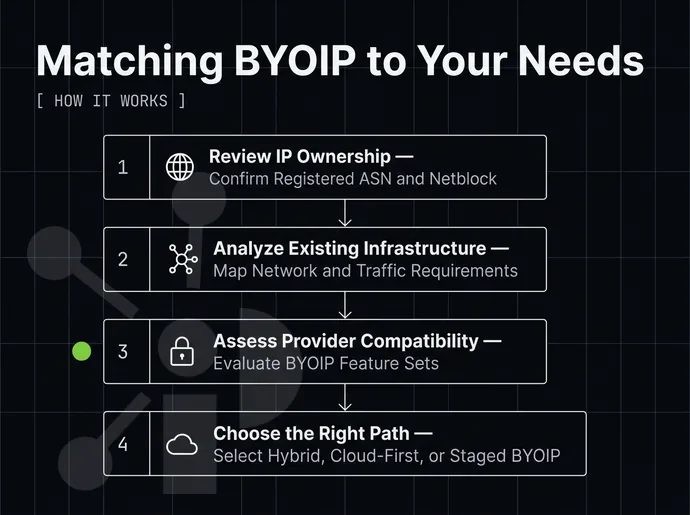
Determine the right BYOIP path for you by answering these 4 questions. The rest should follow naturally.
Four questions that drive the decision
Do you require BGP control?, Custom AS-path prepending, community tagging and traffic engineering requires a full BGP session. Most public cloud BYOIP programs give announcement control to the provider. Bare-metal gives you the session.
Second: are you a single cloud customer or do you need portability? Public cloud BYOIP means a fixed prefix at the edge of the provider. Announced from bare metal, a single block of IP can be moved between providers without having to re-onboard.
Third: Is your block clean enough for a transfer? A single blacklist hit, RPKI invalid, or uncertain RIR registration status will immediately block all possible transfers of that block. This is where Tixx by Prefixx verifies full block ownership and clears all routing-related “hygiene” issues and verifies transfer eligibility.
Fourth: Is your workload latency sensitive or elastic? Gaming, financial trading and other high frequency workloads need consistent paths through your forwarding fabric. Serverless, auto-scaling and managed DDoS are all adjacent to public cloud services.
When public cloud BYOIP wins
Provider-managed announcement is preferred for Rapid horizontal scaling, serverless adjacency, and integrated DDoS scrubbing (e.g. Cloudflare Magic Transit, AWS Shield Advanced). You sacrifice control of the routing for operational ease and scalable capacity.
Public cloud BYOIP makes sense for workloads that are already running within a public cloud provider’s ecosystem and don’t need to be portable.
When bare-metal BYOIP wins
We favor bare metal for Full BGP control, good routing horror stories avoidance and cost efficient scalability at large. Prefixx will create LOA, RPKI ROAs and IRR route objects for you, BYOIP is native on Netrouting bare metal without any per-IP surcharge.
Deterministic paths are critical for latency-sensitive workloads. As traffic volume and consistency increase, bare-metal’s unit economics dramatically outperform those of elastic cloud resources. We will help you get connected to a provider of your choice and handle all of the work related to address sourcing and documentation prior to filling out the provider’s onboarding form.
Why choose Prefixx for BYOIP deployment support
Cloud provider documentation tells you what to submit for a bring your own IP request. It does not source the IPv4 prefix, check its reputation, or prepare a single routing document on your behalf. Prefixx covers that entire gap.
- Vetted blocks, every time. Every IPv4 prefix is checked through Tixx QC before it reaches a buyer: ownership, transfer eligibility, blacklist standing, and routing hygiene are all verified upfront.
- Routing paperwork handled for you. Our team prepares the letter of authorization, RPKI route origin authorization, and IRR route objects. You do not need to navigate RIR portals alone.
- Registered across all major RIRs. Prefixx is a registered broker with ARIN, RIPE NCC, and APNIC, with LACNIC transfers facilitated. Blocks are sourced across the secondary market from every RIR region.
- Bare-metal BYOIP included. BYOIP and BYOASN are natively supported on Netrouting dedicated servers (AS6206) with no per-IP surcharge. BGP announcement, RPKI, and IRR are all handled as part of the deployment.
- White-glove post-live support. After your custom IP prefix is announced, our consultants handle geolocation correction, reverse DNS, reputation monitoring across 12 DNSBLs, and abuse complaint processing. The client portal gives you BGP monitoring, rDNS management, and reputation scanning in one place.
Whether you are deploying onto bare metal or submitting an elastic IP or custom IP prefix request to AWS, GCP, Azure, OCI, or Cloudflare, Prefixx manages the documentation side. Contact sales at Prefixx.net/BYOIP to discuss your block requirements or compare options.
The core differences between cloud BYOIP programs
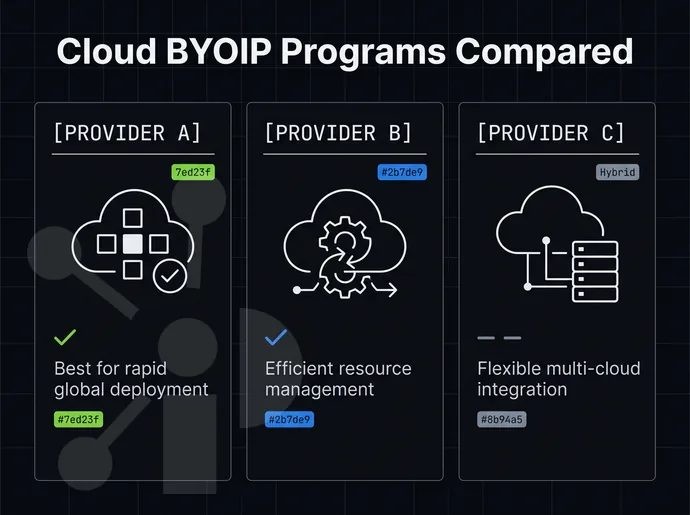
While every cloud BYOIP implementation will start with the same fundamentals of a /24 minimum, signed Route Origin Authorization, Letter of Authorization, and corresponding IRR route object, there are significant differences between the geographic scope, IPv6 support, BGP announcement depth, and how they handle Bring Your Own IP for elastic IP / custom IP prefix pools after you bring the IP online.
Bare-metal BYOIP offers the full control of routing as opposed to the limitations found in cloud BYOIP offerings, however the management of the associated infrastructure will reside with your team. Therefore, the first step to purchasing BYOIP is to ensure the block in question is clean, i.e. transferable, not sold through secondary markets and correctly documented.
The RPKI, LOA and IRR paperwork must be completed prior to submission to each provider to prevent delays. Prefixx completes all the required groundwork to announce the prefix once it has arrived. Below is a simple checklist to ensure all steps are completed prior to the commencement of any paperwork.
Key steps before you deploy BYOIP on any cloud platform
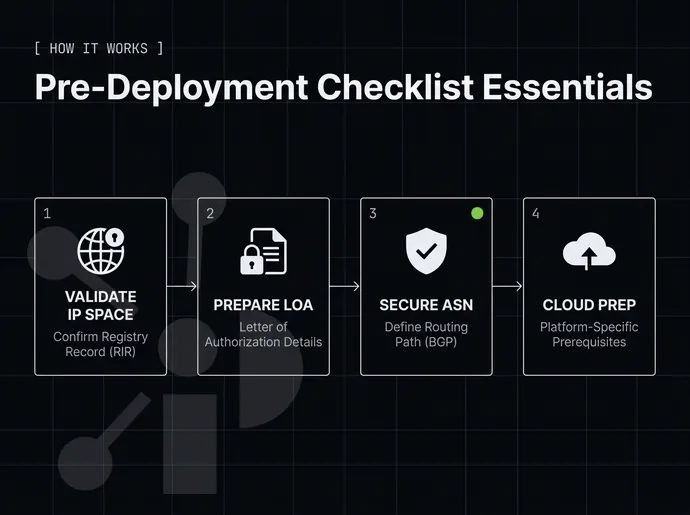
It’s critical to validate any IPv4 block prior to propagation to ensure the IP space is RIR-registered in the customer’s name and transferable. Run a comprehensive reputation and routing health check that includes blacklists, historical BGP announcements and RPKI validity.
Ensure a letter of authorization, RPKI ROA and corresponding IRR route object for the target cloud provider’s ASN are correctly built prior to submission. Each cloud provider has a validation window following submission to deployment, therefore this must be allowed within the overall deployment timeline.
After the custom IP prefix has been announced, check if geolocation databases have updated already and keep an eye on the DNSBL status. Problems with the IP reputation will surface after the BGP announcement, not before. Prefixx takes care of the RIR eligibility check, the secondary market check, the LOA creation, the ROA and IRR setup as well as the monitoring of the IP reputation after the deployment. Thus your team only has to deal with the deployment itself.
Cloud providers support BYOIP, but each has its own set of requirements that can surprise teams. These include minimum block sizes, a public routing history, RPKI and IRR correctness, and LOA format idiosyncrasies of the various registries. Getting the paperwork wrong causes delays, and bringing in a ‘used’ block with a questionable reputation can get it blacklisted before the first packet leaves the subnet.
The quality of the block you bring is just as important as the process you bring to it. A clean /24 (with good historical routing), valid RPKI ROAs, consistent IRR objects and no blacklists get you through onboarding in all the cloud platforms quickly. A block that does not have these characteristics can get stalled for weeks.
If you need a vetted block, help with the LOA, ROA and IRR objects, or guidance on which registry path fits your deployment, contact the team at Prefixx.net. Tixx checks every block before it reaches you, and white-glove routing paperwork is included.
Contact us to discuss your IPv4 needs today
No hidden fees, free consult. A broker replies within one business day.